Style OTS Replacer v1.0.6
Windows 7 or later · x86 and x64 installers available · Free
aa11b183ff643a45f9b4078d62557fff72e92bf389dbe954e628717a352313cb
5f2f93d46165872dcbd85e20ab483b502b0d66c5acb1ea2d821cbaea46f176c0
About
Batch One Touch Settings editor for Yamaha style files
Style OTS Replacer lets you copy One Touch Settings (OTS) from one Yamaha style file to many others in a single operation. Instead of editing each style individually on the keyboard, you manage everything from your PC — with visual slot indicators, voice recognition, and optional MultiPad preservation.
Batch OTS Replacement
Copy OTS configurations from one source style to multiple target styles simultaneously.
Visual Slot Indicators
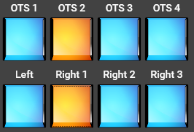
Blue buttons show OTS slots with data; gray buttons indicate empty slots — at a glance.
Multiple Selection
Select several OTS entries at once using checkboxes, then apply them in one operation.
Voice Batch Conversion
Convert voices across multiple styles using a conversion data file for consistent results.
MultiPad Preservation
Optionally keep the original MultiPad data while updating OTS — preserves your custom setups.
Voice Recognition
Supports Genos2, GM, XG, and GM2 voice tables. Unrecognized voices are clearly labeled.
System Requirements
- Windows 7 or later (32-bit or 64-bit)
- .NET Desktop Runtime 5.0 (download from microsoft.com)
- Windows Update KB4457144 may be required on some older systems
- Yamaha Genos, Genos2, or compatible keyboard style files